I Moved Development to a Remote VM. Coding Agents Made Me Stay.
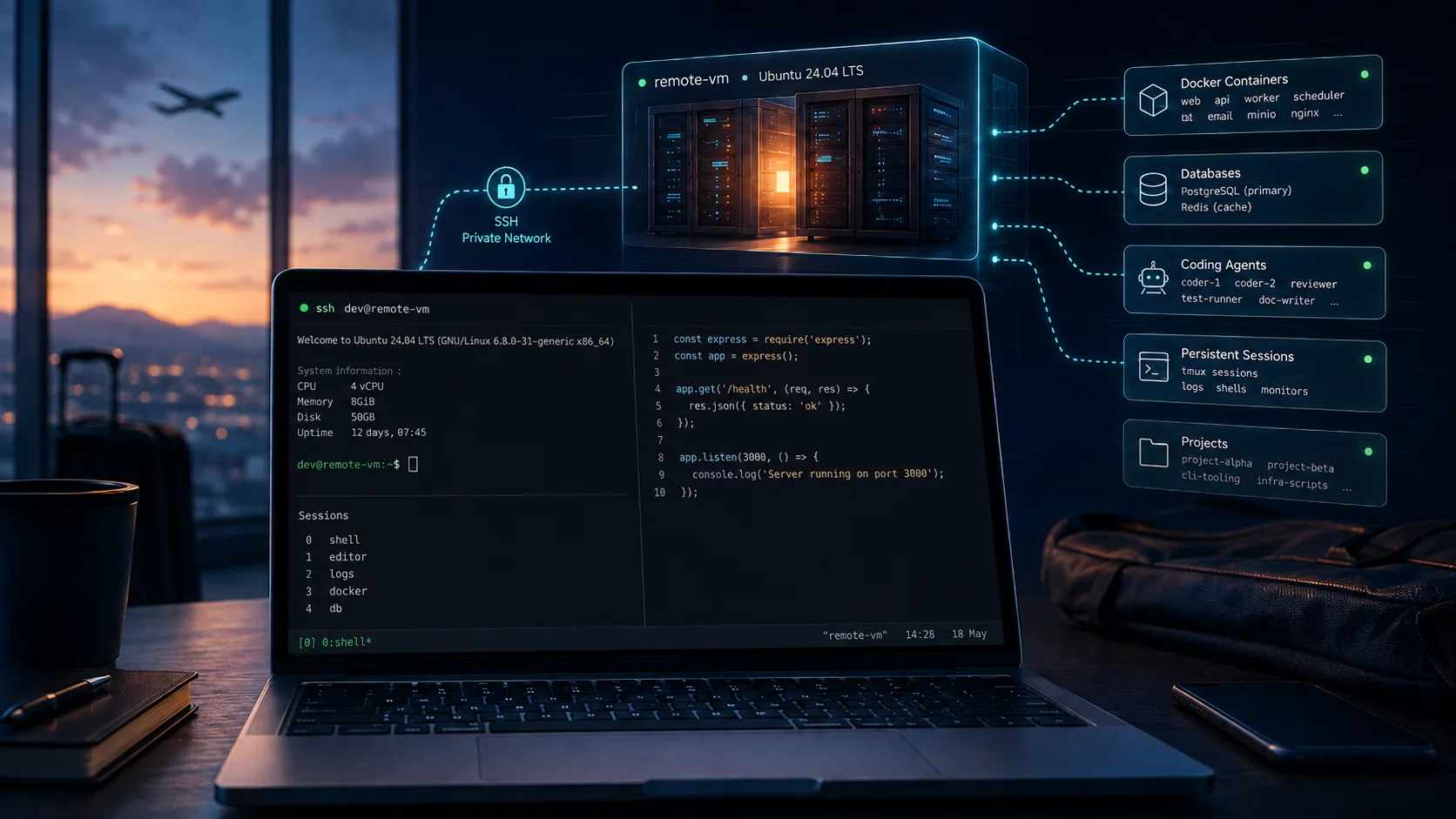
I moved my dev environment to a remote VM to stop rebuilding it across machines. Coding agents and tmux turned the experiment into how I work by default.
On this page
- I Have a Problem With Computers
- Containers Didn’t Solve This Problem
- So I Rented a Linux Computer
- The Local Computer Became Surprisingly Unimportant
- Tailscale Makes the VM Feel Local
- Locking It Down With UFW
- Harden SSH Too
- Development Servers Can Just Listen on the VM
- One Important Docker Trap
- Then tmux Changed the Value Proposition
- Making the Development Machine Reproducible
- Why Not a Machine at Home?
- Why Not Codespaces or Another Cloud Development Platform?
- The Downsides Are Real
- My Computers Are Now Almost Disposable
The moment I realized moving my development environment to a remote VM had been one of my better ideas, I wasn’t sitting at my workstation.
I needed to fix a bug, and the only computer I had with me was my wife’s laptop.
It was a Windows laptop with none of my development environment on it. No PHP setup, no Node or Bun, no Docker environment, no project repositories, no coding agents, no carefully accumulated collection of CLI tools.
A few months earlier, I would either have postponed the fix or started converting somebody else’s laptop into a temporary version of mine before I could even look at the bug.
Instead, I installed Tailscale, authenticated, connected to my development VM and started working.
It took around ten minutes, and a decent part of those ten minutes was simply because I rarely use Windows and had to remember where everything was.
The development environment itself was already waiting for me.
That was when the whole experiment clicked.
My laptop was no longer my development machine. It was just a way to reach one.
I Have a Problem With Computers
I work from multiple machines. There are workstations, laptops, travel, and occasionally whatever computer happens to be available.
I also have another problem: I like trying Linux distributions.
There is always some new distribution, compositor, shell, package manager or beautifully configured GitHub repository waiting to convince me that clearly this is the environment I have been searching for all my life.
This is great fun until your computer also happens to be the machine on which you earn your living.
Setting up a development environment for the kind of projects I work on is not simply:
git clone ...npm installI work across PHP, Node, Bun, Python, Docker, databases, Redis and various command-line tools. Then there are GitHub CLI, coding agents, SSH configuration, shell configuration, editor tooling and all the small utilities accumulated over years.
On Arch, something like getting PHP 8.4 and all the extensions required by different projects exactly how I want them can turn into a surprisingly long exercise.
Do that repeatedly and eventually distro hopping stops being fun.
I had already tried reducing the pain. I kept configurations elsewhere and used SSHFS for some things. That helped, but it also meant that after installing an operating system, getting SSHFS working became the mandatory first step before I could start reconstructing everything else.
Eventually I realized I was solving the wrong problem.
Instead of repeatedly making every computer a complete development machine, why did every computer need to be a development machine at all?
Containers Didn’t Solve This Problem
The obvious answer is containers.
I use Docker regularly, and it solves an extremely important problem. For development databases, I actively prefer it. If a project needs PostgreSQL or MySQL, I usually run the database in Docker because I don’t want to maintain database servers directly on the development machine.
Spin it up, use it, throw it away when necessary.
But I briefly tried pushing the idea further and containerizing more of the development environment itself.
Technically, it works.
Ergonomically, I didn’t like it.
When I am developing, I want simple things to remain simple. If I decide I need another npm package, I want to install it. I don’t want to stop and remember which container I am in, which command wraps the package manager, whether the container needs rebuilding, how volumes are mounted, or what incarnation of docker exec I need this time.
There are workflows where that level of isolation is exactly what you want. There are excellent development-container systems built around that philosophy.
It just isn’t how I want to work.
Thinking requires lower overheads, not higher ones.
I still use containers extensively. I just stopped trying to make containers the answer to every development-environment problem.
What I actually wanted was much simpler.
I wanted a Linux computer that was always configured for development, regardless of which physical computer happened to be sitting in front of me.
So I Rented a Linux Computer
I spun up an Ubuntu 24.04 VM.
Nothing exotic.
My current machine has 4 vCPUs and 8 GB of RAM. I host it with E2E Networks because I wanted a data centre in India, the latency works well for me, and the pricing is reasonable. It costs me around ₹3,200 per month.
That number should not be interpreted as “remote development costs ₹3,200 per month.” The same VM also runs Hermes, a personal agent of mine that works continuously in the background, and another developer may need considerably less or considerably more compute.
For my workload, 4 vCPUs and 8 GB have been perfectly adequate. Someone compiling large projects, running several heavy containers, using local models or doing compute-intensive work may have completely different requirements.
The provider itself is also not important to this setup. Use whatever provider gives you acceptable latency, reliability and pricing.
On the VM I keep the tools I actually develop with: GitHub CLI, Docker, PHP, Node, Bun, Python, Redis, Claude, Codex, OpenCode, Kimi Code, tmux, and the usual collection of command-line utilities.
My projects live under a simple structure:
~/projects/├── project-a/├── project-b/├── project-c/└── ...GitHub remains the source of truth for the code.
There is no elaborate synchronization mechanism between my laptop and the VM because there is nothing to synchronize. The working environment is on the VM. Sometimes I still clone a repository locally for some reason, but that is just another Git clone, not part of the workflow.
That eliminated an entire category of problems.
There is only one development environment.
The Local Computer Became Surprisingly Unimportant
My bootstrap process for a new computer now looks roughly like this:
Install operating system ↓Install Tailscale ↓Authenticate ↓SSH into devbox ↓Start workingIf I want a full editor, I install VS Code or one of the JetBrains IDEs and connect remotely.
If I don’t have an editor yet, SSH is enough.
I can use Vim.
And yes, I know how to exit it.
With Tailscale MagicDNS enabled, I don’t even need to remember an IP address. My development machine is simply something like:
ssh ravi@devboxThe browser remains local. Beekeeper Studio remains local. My desktop applications remain local.
I have not moved my entire desktop into a data centre.
I have moved the development environment there.
That distinction matters.
Tailscale Makes the VM Feel Local
A VM on the public internet needs to be treated like a server on the public internet.
Putting your development environment on a cloud VM and then exposing SSH, databases and development servers directly to the world is not a workflow improvement.
It is an incident waiting for a sufficiently bored bot.
My approach is to treat Tailscale as the network through which I access the machine.
The VM can have a public IP, but I don’t need development services accepting public traffic. If your provider allows you to run without a public IP while retaining the outbound connectivity required by Tailscale, that reduces the exposed surface further. It isn’t essential to the architecture, though.
My own basic rules are simple:
- Root SSH login is disabled.
- Password-based SSH authentication is disabled.
- Incoming traffic is denied by default.
- SSH is accessed through Tailscale.
- Development HTTP and HTTPS services are accessed through Tailscale.
- Nothing gets a public firewall rule merely because I happen to need it during development.
Before changing firewall rules, however, get Tailscale working first.
Locking down SSH before verifying your private path into the server is an excellent way to learn how good your cloud provider’s emergency console is.
On a fresh Ubuntu VM, install Tailscale and authenticate the machine:
curl -fsSL https://tailscale.com/install.sh | shsudo tailscale upThen verify the machine appears in your tailnet and, if you use MagicDNS as I do, confirm that you can connect using its hostname:
ssh ravi@devboxOnly after that connection works would I remove public SSH access.
Locking It Down With UFW
Ubuntu’s UFW makes the basic host policy pleasantly boring.
I want incoming traffic denied unless I have explicitly decided otherwise, while outgoing traffic remains allowed:
sudo ufw default deny incomingsudo ufw default allow outgoingThen I allow traffic arriving through the Tailscale interface:
sudo ufw allow in on tailscale0After checking the rules, enable the firewall:
sudo ufw enablesudo ufw status verboseThe important part is what I don’t add.
I don’t add a general:
sudo ufw allow 22/tcpbecause that would make SSH available through the public interfaces again.
Similarly, I don’t need public rules for ports 3000, 8000 or whatever development server I happen to start that day.
For my personal setup, my tailnet contains only my devices, so allowing inbound traffic on tailscale0 is a reasonable trade-off for convenience.
That assumption changes completely in a team environment. If multiple developers, servers, CI systems or other users share the tailnet, use Tailscale grants or ACLs to define which identities and devices can access which resources. “They are on our tailnet” should not automatically mean “they can SSH into every development machine.”
If your cloud provider offers another network firewall or security-group layer, using that as an additional default-deny boundary is also sensible. Host firewall and provider firewall protect different failure modes.
Harden SSH Too
Tailscale reduces the exposed network surface. It doesn’t remove the need to configure SSH sensibly.
I disable root login and password authentication and use key-based authentication. On Ubuntu, I prefer making that explicit in an SSH configuration drop-in:
sudo nano /etc/ssh/sshd_config.d/00-devbox-hardening.confWith:
PermitRootLogin noPasswordAuthentication noKbdInteractiveAuthentication noPubkeyAuthentication yesBefore reloading SSH, validate the configuration:
sudo sshd -tThen reload the service:
sudo systemctl reload sshYou can also inspect the effective values:
sudo sshd -T | grep -E \ 'permitrootlogin|passwordauthentication|kbdinteractiveauthentication|pubkeyauthentication'Again, keep an existing session open until you have successfully opened a second session using the configuration you intend to keep.
Security is good.
Security that locks only you out is less impressive.
Development Servers Can Just Listen on the VM
Once access to the host is limited appropriately, development servers become straightforward.
For Laravel, for example:
php artisan serve --host=0.0.0.0 --port=8000Then from my local browser:
http://devbox:8000A Vite application can similarly listen on all interfaces:
npm run dev -- --host 0.0.0.0For FastAPI with Uvicorn:
uvicorn app.main:app --host 0.0.0.0 --port 8000 --reloadA normal Node service can listen the same way:
app.listen(3000, '0.0.0.0');The key point is that binding something to 0.0.0.0 is not what makes this safe.
0.0.0.0 means “listen on all interfaces.”
The firewall and private-network policy are what prevent that service from being publicly reachable.
That distinction is important. Copying only the 0.0.0.0 part of this setup onto an unprotected cloud VM is a very different architecture.
Some frameworks also need an explicit configuration change for a remote development hostname. Next.js, for example, may require you to allow the development origin you are accessing over your tailnet.
The exact configuration can change over time, but the principle stays the same: your development server needs to trust the hostname or origin you are using from the local browser.
One Important Docker Trap
There is an important exception to the UFW story: Docker-published ports need extra attention.
Docker manages its own firewall and NAT rules. On Linux, ports published using something like:
docker run -p 5432:5432 ...can bypass the filtering you thought UFW was providing.
That means I would not assume “UFW says deny” automatically makes a Docker-published database private.
If I want a PostgreSQL container directly reachable over my tailnet, the safer pattern is to publish the port specifically on the VM’s Tailscale address rather than every interface.
Get that address with:
tailscale ip -4Then bind Docker to it:
docker run \ -p 100.x.y.z:5432:5432 \ postgresThe same idea works in Compose:
services: db: image: postgres ports: - '${TAILSCALE_IP}:5432:5432'Now a local database client such as Beekeeper Studio can connect to the database through the Tailscale address while the database is not simply published on every host interface.
This is one of those details that is easy to miss because Docker and UFW do not interact in the intuitive order people often assume.
Then tmux Changed the Value Proposition
I originally did all of this because I wanted to stop rebuilding development environments.
That alone was enough to make the experiment worthwhile.
Then coding agents became a larger part of my workflow, and suddenly having an always-on remote development machine became much more valuable.
This is where tmux becomes the superhero of the setup.
I generally keep one tmux session per project:
ssh ravi@devboxcd ~/projects/logctl
tmux new -s logctl
Inside that session I can work normally, start development servers, inspect logs or launch a coding agent.
Suppose I start Claude on a task:
claudeThe task is going to take a while.
I don’t need to keep the laptop involved.
I detach from tmux with:
Ctrl-b dThen I can close the laptop, leave the office, go home and have dinner.
The VM doesn’t care.
The agent continues working because neither the process nor the tmux session was running on my laptop in the first place.
Later, from the same machine or an entirely different one:
ssh ravi@devboxtmux attach -t logctlAnd I am back in the same session.
That is a much bigger change than remote editing.
Git has always made code portable.
The remote VM makes my working state portable.
The shell session, the development server, the logs and the coding agent all continue to exist regardless of what happens to the device in front of me.
My laptop can be shut down.
The work does not have to be.
Making the Development Machine Reproducible
There is an obvious danger in moving everything to one VM: eventually that VM becomes a precious snowflake.
Lose it and you discover that your “portable development environment” was actually just another machine with five years of undocumented configuration.
I don’t want that either.
My whole development-environment configuration is itself maintained in a private Git repository.
A simplified version looks like this:
dev-environment/├── bootstrap.sh├── packages/│ └── ubuntu.txt├── dotfiles/│ ├── bashrc│ ├── gitconfig│ ├── tmux.conf│ └── ssh-config.example├── scripts/│ ├── install-docker.sh│ ├── install-php.sh│ ├── install-node.sh│ └── install-tools.sh└── README.mdThe actual repository contains things specific to my workflow, which is why I keep it private.
The useful part is the pattern, not my package list.
Someone developing primarily in Go or Rust should not inherit my PHP environment simply because I wrote a blog post about it.
The bootstrap script acts as the entry point:
git clone <your-dev-environment-repository>cd dev-environment./bootstrap.shConceptually, mine orchestrates the individual setup scripts:
#!/usr/bin/env bashset -euo pipefail
sudo apt update
./scripts/install-docker.sh./scripts/install-php.sh./scripts/install-node.sh./scripts/install-tools.sh
echo "Development environment bootstrap complete."
I keep configuration in Git and secrets out of it.
For secrets and credentials I mostly use Bitwarden.
The VM itself is also backed up daily.
That gives me several layers: GitHub protects the project history. The development-environment repository documents how the machine is constructed. Bitwarden holds secrets. VM backups protect the current working state, including the inevitable things that have not yet made it into Git.
The remote VM gives me persistence.
Git makes sure persistence does not turn into dependency.
Why Not a Machine at Home?
You absolutely can do this with a machine sitting at home.
I tried it.
Install Tailscale on a workstation, leave it running and remotely SSH into it. Architecturally, it gets you much of the same experience without a monthly cloud bill.
Then broadband becomes unstable.
Or there is a power cut.
Your SSH session freezes, and when the electricity eventually returns, the computer decides not to come back exactly as expected.
Now your remote development infrastructure requires somebody physically near the machine to press a power button.
A home server gives you remote development.
A data-centre VM gives you remote development without making your house part of the infrastructure.
For me, paying for the VM is partly paying for boring things: power, connectivity, availability and somebody else being responsible for the physical hardware.
Boring infrastructure is underrated.
Why Not Codespaces or Another Cloud Development Platform?
GitHub Codespaces, Gitpod, DevPod and similar tools solve real problems, and for many teams they may be a better solution.
What I wanted was slightly different.
I didn’t want a development environment for a repository.
I wanted a development computer.
I wanted one persistent Linux machine containing my language runtimes, Docker databases, CLI tools, caches, scripts, GitHub authentication, coding agents and tmux sessions.
Once I pay for the VM, I don’t spend much time thinking about workspace lifetimes, per-project environments or whether a long-running agent belongs to a particular development session.
The machine is there.
I SSH into it.
Everything is ready with a command.
Again, this isn’t universally better. It just matches how I work.
The Downsides Are Real
There is one enormous requirement for this workflow:
You need good internet.
Without it, your development machine might as well be on Mars.
That is the trade-off I accepted when I moved the environment away from the laptop. My development setup is no longer tied to a particular computer, but it is now tied to network connectivity.
Remote editor performance can also be noticeable. VS Code Remote SSH works, but I find it slower than purely local development. JetBrains’ remote-development experience works better for some of my usage, but that also introduced an additional software cost for me.
Rapid browser iteration is another place where you feel the network.
When developing locally, the path from application to browser is almost nothing. With the VM, every refresh has to travel to the server and back. Most of the time this is perfectly acceptable, but when changing something repeatedly and refreshing very quickly, network latency and bandwidth become visible.
The network stack itself becomes another dependency. Your machine, internet connection, Tailscale, hosting provider and the VM all need to cooperate.
If something in that chain decides today is the day it wants attention, you are stuck until it is fixed.
There are also surprisingly mundane annoyances.
Screenshots are one of them.
When a coding agent is running locally, I can take a screenshot and paste it into whatever workflow I am using. With the agent running remotely, the screenshot exists on my laptop while the agent exists on another computer.
I can obviously transfer it:
scp screenshot.png ravi@devbox:~/tmp/That is not difficult.
It is still more friction than paste.
This setup also makes little sense for someone who frequently needs to work offline, depends on powerful local GPUs, moves very large files constantly, or is already completely happy with a reproducible local development environment.
A local VM could solve parts of my original problem too. I simply don’t want to work that way.
None of these approaches is morally or technically superior.
This is just the set of trade-offs I prefer.
My Computers Are Now Almost Disposable
The funny part is that I started this as an experiment.
I wanted the freedom to install another Linux distribution without immediately thinking about the hours required to rebuild PHP, Node, Python, Docker, agents, configs and everything else I actually need for work.
The remote VM solved that.
Today, after installing a new distribution, the first truly mandatory development tool is Tailscale.
Once that works, I can SSH into devbox and start coding immediately. Everything else on the laptop can be configured when I feel like it.
But that is no longer the main reason I stay with remote development.
Coding agents changed the equation.
Software development increasingly includes processes that may work for minutes or hours without requiring me to stare at the terminal. Running them on an always-on machine inside persistent tmux sessions feels fundamentally different from running them on a laptop I need to carry, suspend, reboot or shut down.
I moved development to a remote VM because I wanted my laptops to become disposable.
I stayed because I realized my development sessions could become independent of them too.
The laptop in front of me can be Arch, Ubuntu, Windows, some distribution I discovered yesterday, or my wife’s completely unprepared computer.
It doesn’t really matter anymore.
Install Tailscale.
Connect to devbox.
Continue working.
For someone with my particular combination of multiple machines, distro-hopping, multiple technology stacks and increasingly long-running coding agents, that has turned out to be a remarkably good trade.
LogCTL Dispatch
New essays, experiments and workflows. No daily noise.
Usually 2–4 emails a month.
Comments
Loading comments…