My Agentic Web Development Setup Is Basically a `while True` Loop
A multi-model web development pipeline — research, design, implementation, review — eventually orchestrated by a boring Python while True loop.
On this page
- First, a source of truth
- The actual page pipeline
- Luna does the excavation
- Sonnet checks whether the website agrees with itself
- Sol becomes the designer
- Sol at medium creates the visual assets
- Opus gets to write the code
- Then GPT reviews Claude
- I was the orchestration framework
- Then I found gh-aw
- Problem one: GitHub Actions minutes
- Problem two: I was paying for the models twice
- And then came the sophisticated architecture
- One day, roughly $20, and a while True
- The interesting part is not the loop
Make the contracts sophisticated. Keep the orchestration boring.
Web development in 2026 has become slightly absurd. A few years ago, building a website meant deciding the information architecture, creating wireframes, arguing about components, writing CSS, building pages, reviewing them, fixing responsive breakpoints, and eventually discovering that somebody had used margin-top: 47px because we had all collectively given up.
Now the workflow can be:
Here is the old website. Rebuild it. Make it modern.
And Claude or Codex goes away for a while and comes back with something surprisingly decent. For a lot of websites, that is enough.
For the website I was working on, it wasn’t.
I was revamping an old site with a lot of existing content spread across many pages. Some of it was still correct. Some was outdated. Some contradicted other pages. The new site needed a consistent design language, new imagery, better content structure and — most importantly — it needed to stay factually coherent across the whole thing.
And because my UI/UX skills are roughly as good as my drawing skills, and in drawing I can occasionally produce a straight line, I decided to rely almost entirely on coding agents. Not one agent. Several of them, each doing the part it was particularly good at.
That worked extremely well. There was only one problem: eventually I realised I had become the API between the agents.
First, a source of truth
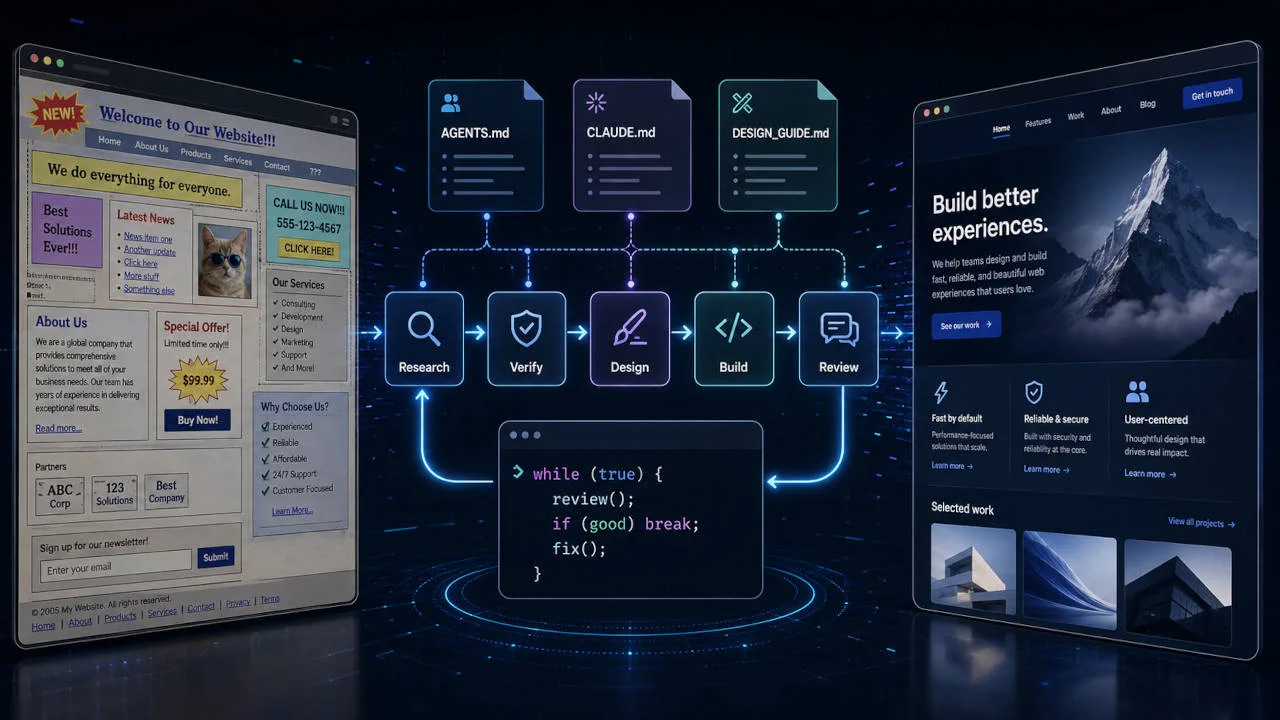
Before giving anything to an agent, I spent time defining how the website was supposed to work. That lives primarily in AGENTS.md, which I treat as the project’s truth source. It contains the things I do not want to explain again every time a model starts a fresh session: architecture, coding conventions, component expectations, design principles, accessibility requirements, responsive behaviour, content rules, validation expectations, and the things an agent absolutely should not do just because they look convenient.
The important distinction is that these are not task instructions. They are system rules for the repository. A task might say “redesign the About page.” AGENTS.md says what “redesign” is allowed to mean inside this particular project.
For Claude Code I also maintain a CLAUDE.md, but I deliberately do not duplicate the repository philosophy there. It starts by telling Claude to read and follow AGENTS.md, then adds only what is useful when Claude is the execution harness:
Read AGENTS.md before doing any work.
AGENTS.md is the canonical source of truth for repository architecture,design constraints, implementation standards and validation requirements.
Claude-specific instructions:
- inspect existing components before creating new ones- do not silently change approved content- run the relevant validation commands before completing work- use the approved design plan when one exists- create a focused branch and PR for implementation work
There is also a DESIGN_GUIDE.md, which goes deeper into the visual system: typography, spacing rhythm, page composition, image treatment, section density, cards, colours, navigation patterns, CTA behaviour, and the overall visual character of the site. I keep it separate because AGENTS.md describes how we work, while DESIGN_GUIDE.md describes what the resulting interface should feel like.
Once these existed, agents stopped inventing a new design philosophy on every page. That alone made an enormous difference.
The actual page pipeline
The task sounds simple: take an old webpage and create a much better new version of it. But I don’t start by asking an expensive coding model to rebuild the page. I start with content.
Luna does the excavation
I give the old page URL to Codex running GPT-5.6 Luna. Its job is not to design anything; its job is to understand what the page is trying to communicate. It examines the old page, extracts the useful information, identifies questionable or outdated claims, checks those claims against the sources available to it, and proposes what the new page should actually say.
This is exactly the sort of work that does not need the most expensive model in the stack. OpenAI positions Luna for efficient, high-volume workloads, which makes it a sensible first pass for extraction, research and structured analysis.
The output is not HTML. It is closer to:
# Proposed Page Content
## Purpose...
## HeroHeadline:Supporting copy:Primary CTA:
## Section 1Heading:Content:Facts requiring verification:...
That becomes the first content draft.
Sonnet checks whether the website agrees with itself
The Luna output then goes to Claude Sonnet 5, with a different job: do not redesign the content, verify it.
It fact-checks again, removes ambiguous statements, improves wording where needed, and performs something I have found increasingly important on larger sites — consistency checking.
Suppose the homepage says “trusted by more than 20 clients.” Another page says “more than 30 organisations trust us.” An old news article says “serving 18 clients across three regions.” All three statements may have been correct when somebody wrote them. The website is still wrong.
A website is effectively a distributed database of claims where humans have historically been allowed to update individual records using a text editor. That is not a great consistency model.
So Sonnet does not evaluate the page in isolation. It checks important claims against the rest of the approved site content: numbers, dates, names, locations, products, services, statistics — anything that should have one current answer. Only after that pass do I consider the content approved.
Sol becomes the designer
The approved content goes to GPT-5.6 Sol at xHigh reasoning, along with AGENTS.md and DESIGN_GUIDE.md. This is where page design actually begins.
Not “make a modern hero with some cards.” I want:
## Hero
Layout:- full-width editorial composition- 12-column desktop grid- copy occupies columns 1-6- visual occupies columns 8-12
Typography:...
Spacing:...
Mobile transformation:...
Required assets:1. hero-campus-wide.webp   - 16:9   - subject positioned right   - ample negative space on left   - no text embedded in image
2. research-lab.webp   - landscape   - documentary photography style...
The important part is that the design agent explicitly identifies the images the implementation will require. GPT-5.6 suits this stage because the family was improved specifically around frontend layout, visual hierarchy and design judgment, and Sol supports the deeper reasoning settings I want for a planning pass. This is the one stage where I deliberately buy the expensive thinking, because every decision made here gets inherited by everything downstream.
Now the developer is not designing while coding. The major visual decisions have already been made.
Sol at medium creates the visual assets
The image manifest from the design plan goes through another Sol pass, this time at medium. There is little reason to spend xHigh reasoning on “generate a horizontal image with this composition and these visual constraints” — the prompts are already well defined. This stage produces the assets the design requested, with aspect ratios, subject placement and visual purpose already decided upstream.
That matters more than it sounds. One of the easiest ways to get a mediocre AI-built website is to build the layout first and then search for whatever image approximately fits the hole. Here the process is reversed: the design decides what visual belongs there, then that visual gets created for the design.
Opus gets to write the code
Now Claude Opus 5 receives the approved content, the design plan, the generated assets, the three instruction files and the existing repository.
At this point its job is deliberately boring: implement the plan. It creates the page, reuses existing components where appropriate, adds the assets, validates the result, creates a branch and opens a pull request.
This separation has been surprisingly useful. I do not want the implementation agent simultaneously deciding what the page should say, whether that information is correct, what the design should be, and how the code should be structured. That is too many degrees of freedom. Opus is excellent at development, so I let it develop.
Then GPT reviews Claude
Once the pull request exists, Sol at xHigh comes back — but now as the reviewer. It gets the approved design plan, the repository instructions and the PR diff.
The review has two dimensions. First, normal code review: architecture, duplication, maintainability, accessibility, unnecessary abstractions, responsive implementation, regressions, and anything suspicious in the actual change. Second, design review: did Opus actually implement the approved plan? If the plan called for an asymmetrical editorial hero and the implementation quietly turned it into three cards — because cards are the natural resting state of every AI-generated interface — that gets flagged. Wrong spacing, wrong image treatment, mobile behaviour deviating from the plan: flagged.
Sol leaves the review. Opus receives the findings and makes the changes. Sol reviews it again.
Only after the final review pass do I enter the loop properly, look at whatever issues remain, and decide whether they are actually worth fixing. Because an AI reviewer can always find another thing to improve, and at some point software has to leave the pull request. So the machine identifies unresolved concerns and I take the final call.
That was my workflow, and it worked very well. There was just one small architectural problem.
I was the orchestration framework
Look again at what I was doing. Codex generated the content analysis; I copied it to Claude. Claude produced the verified version; I copied that to GPT. GPT produced the design plan; I passed the image requirements to another session, then downloaded the assets. I gave those and the plan to Opus. Opus created a PR. I opened the PR, gave it back to GPT, GPT reviewed it, I gave the comments back to Opus, Opus fixed them, I gave it back to GPT.
After a few pages I realised that the most deterministic component in my sophisticated multi-model AI development platform was me pressing Ctrl+C and Ctrl+V. I had successfully automated web development while retaining the most intellectually rewarding part for myself: copy-pasting text between terminals.
Clearly, progress.
Then I found gh-aw
While looking for a better way to orchestrate this, I found GitHub Agentic Workflows, or gh-aw. You define agentic workflows inside the repository, connect them to GitHub events, and let GitHub Actions run the agents.
One technical correction to how I first thought about it: you do not primarily author giant GitHub Actions YAML files. A gh-aw workflow is a Markdown file under .github/workflows/ with YAML frontmatter describing triggers, permissions and the AI engine. gh aw compile generates the hardened .lock.yml workflow that GitHub Actions actually executes.
So instead of me carrying state from agent to agent, GitHub itself could become the state machine. Issues and pull requests are the database. Labels are state transitions. Agents are workers. That is much closer to a real workflow.
I could create an issue like:
Title: Revamp /services/consulting
URL:https://old.example.com/services/consulting
Requirements:Preserve the useful information from the existing page.Verify potentially outdated facts.Follow AGENTS.md and DESIGN_GUIDE.md.
label it web-revamp, and let the chain run.
The first workflow reacts to the issue. A simplified content-research.md:
---on:  issues:    types: [opened, labeled]    names: [web-revamp]
engine: codex
permissions:  contents: read  issues: read
safe-outputs:  add-comment:    max: 1  add-labels:    allowed: [content-draft-ready]---
# Research Existing Page
Read AGENTS.md.
Read the URL and requirements from the triggering issue.
Analyze the existing page.
Identify:- content that should be retained- outdated or questionable facts- missing information- duplication- claims that should be checked against existing repository content
Research and verify claims using available sources.
Produce a structured content proposal for the replacement page.
Add the complete proposal as a comment on the issue.
When complete, add the label `content-draft-ready`.
Verification, design planning, asset generation and implementation each follow the same shape: watch for the previous stage’s label, do one job, post the artifact, apply the next label. gh-aw has controlled safe outputs for exactly this sort of repository interaction, including creating pull requests, submitting PR reviews and pushing corrections to a branch.
The interesting one is the review workflow, because it attaches to the PR rather than the issue:
---on:  pull_request:    types: [opened, synchronize]    names: [agentic-web]
engine: codex
permissions:  contents: read  pull-requests: read
safe-outputs:  create-pull-request-review-comment:    max: 10  submit-pull-request-review:    allowed-events: [COMMENT, REQUEST_CHANGES]  add-labels:    allowed: [agent-fix, ready-for-human]---
# Review Implementation
Read:- AGENTS.md- DESIGN_GUIDE.md- the approved page content- the approved design plan- the complete PR diff
Perform both a code review and a design-conformance review.
If meaningful changes are required:1. submit the findings as a review2. request changes where appropriate3. add the `agent-fix` label
If there are no meaningful remaining issues:1. submit the final review2. add `ready-for-human`
And the fix workflow is almost comically small:
---on:  label_command: "agent-fix"
engine: claude
permissions:  contents: read  pull-requests: read
safe-outputs:  push-to-pull-request-branch:    required-labels: [agentic-web]---
# Apply Review Fixes
Read AGENTS.md and CLAUDE.md.
Read all unresolved review feedback on the triggering PR.
Apply the valid requested changes.
Run the relevant validation.
Push the corrected implementation to the existing PR branch.
A push changes the PR. The synchronize event wakes up the reviewer. The reviewer finds problems and applies agent-fix. Opus fixes them. The PR changes. The reviewer runs again. Eventually it becomes ready-for-human. That is the loop.
label_command is well suited to this because applying the label fires the workflow and the label is then removed automatically, so it can be re-applied to trigger again. That is exactly the semantics a fix-review cycle needs, and it is why labels make a surprisingly convenient little state machine.
There is one GitHub detail worth knowing if you build this exact chain. Pull requests or branch pushes made using the default Actions GITHUB_TOKEN do not normally trigger another workflow, specifically to prevent recursive event cascades. gh-aw documents GH_AW_CI_TRIGGER_TOKEN as one mechanism for intentionally enabling that next event when you actually want the cascade.
You install the extension, run gh aw compile, and commit both the human-readable .md sources and the generated .lock.yml files.
I had my agentic website factory. Then I discovered the bill.
Problem one: GitHub Actions minutes
Agentic workflows are not particularly short jobs. An agent can inspect a repository, reason for several minutes, run tools, generate output, test code and perform another pass. Multiply that by research, verification, design, implementation, review, fix, review again — and then multiply by every page.
GitHub Free currently includes 2,000 Actions minutes per month for private-repository hosted-runner usage, and higher plans have their own allowances. That can disappear surprisingly quickly when you turn GitHub Actions into an AI employee who enjoys thinking.
This problem was easy to solve, because I already have computers. GitHub supports self-hosted Actions runners, and using your own machine does not consume GitHub-hosted compute billing; you provide and maintain the hardware, GitHub generates the registration commands, and the job routes to it with a label.
One caveat deserves more attention than it usually gets: do not casually attach a privileged personal machine as a self-hosted runner to a public repository. GitHub specifically warns that malicious code from fork-based pull requests can reach the runner. I use a controlled machine for repositories I trust.
Problem solved. Except this was not actually my expensive problem.
Problem two: I was paying for the models twice
My existing workflow already used tools and subscriptions I was paying for. Once I moved those calls into GitHub Actions, the economics changed. gh-aw supports Claude and Codex as engines, but in Actions those engines authenticate using provider credentials such as ANTHROPIC_API_KEY and OPENAI_API_KEY. Which means API billing.
Now every research pass, every design plan, every Opus implementation and every xHigh review was consuming API tokens. I had automated away the copying. I had also created a machine capable of converting money into pull-request comments with tremendous efficiency.
There is a reasonable objection here, and it is worth answering directly: gh-aw also supports a Copilot engine, which bills against a subscription rather than raw API keys. If your pipeline is model-agnostic, that is probably your answer. Mine isn’t. The entire premise of this setup is that Luna does extraction, Sonnet does independent verification, Sol designs and then reviews, and Opus implements. Collapsing all of that into whatever model the harness hands me removes the thing that made the pipeline work in the first place.
The self-hosted runner solved compute cost. It did nothing about inference cost. And this annoyed me for a very simple reason: locally, I already had the coding tools. So why was I putting the models inside GitHub Actions at all? GitHub was useful as a collaboration surface. It did not have to be my orchestrator.
And then came the sophisticated architecture
It helped to state the problem precisely. The objective was not to automate development. Development was already automated. I needed to automate the API: me.
Naturally, I considered orchestration frameworks. I could build agents, define roles, create a graph, add state transitions, introduce memory. Maybe a supervisor. Perhaps a message bus. A retry policy. Event sourcing. At this point I was approximately fifteen minutes away from founding an AI orchestration startup.
Then I looked at the workflow again:
research → verify → design → assets → implement → review → fix ↑ | └────────┘One branch. One loop. I have written more sophisticated control flow while teaching programming.
The workflow did not need agents discovering what to do next. Every transition was already known. The models provided intelligence inside each stage; Python only needed to provide control flow between them. Once I separated those two things, the orchestrator became almost embarrassingly small.
So I wrote Python.
def main(url: str):    # 1. Research the old page.    content_draft = codex(        prompt=f"""Read AGENTS.md.Analyze the old page: {url}Determine what the replacement page should contain.Research potentially outdated claims and check them against availablecurrent sources and repository content.Do not design the page.Return a structured content specification.""",        model="gpt-5.6-luna",        effort="medium",    )    save("content-draft.md", content_draft)
    # 2. Independent fact + consistency pass.    content_final = claude(        prompt=f"""Read AGENTS.md.Below is the proposed content for a page being rebuilt:--- BEGIN CONTENT ---{content_draft}--- END CONTENT ---Fact-check it, then check important claims against the rest of thewebsite for cross-page consistency.Resolve contradictions where sufficient evidence exists.Clearly flag anything that still requires human judgment.Return only the final approved content specification.""",        model="sonnet",    )    save("content-final.md", content_final)
    # 3. Design the page.    design_plan = codex(        prompt=f"""Read AGENTS.md and DESIGN_GUIDE.md.Design a page for the following approved content:--- BEGIN CONTENT ---{content_final}--- END CONTENT ---Create an implementation-level design specification.Explicitly list every image asset required, including purpose,composition, aspect ratio, subject placement and responsiveconsiderations.Do not implement the page.""",        model="gpt-5.6-sol",        effort="xhigh",    )    design_file = save("design-plan.md", design_plan)
    # 4. Generate required images.    generate_images(design_file)
    # 5. Let Opus implement the approved plan.    claude(        prompt="""Read AGENTS.md, CLAUDE.md and DESIGN_GUIDE.md.Read .agent-work/content-final.md and .agent-work/design-plan.md.Use the generated assets from public/images/generated/.Implement the page exactly according to the approved content anddesign plan.Run the repository validation commands.Create a focused branch, commit, push and open a pull request.""",        model="opus",    )
    # 6. Review -> fix -> review until the reviewer is happy.    while True:        review = codex(            prompt="""Read AGENTS.md and DESIGN_GUIDE.md.Read .agent-work/content-final.md and .agent-work/design-plan.md.Inspect the current implementation and pull request.Perform a code review, a design-conformance review, a responsivereview and a content-consistency review.End with either VERDICT: CHANGES_REQUIRED or VERDICT: PASS.""",            model="gpt-5.6-sol",            effort="xhigh",        )        save("latest-review.md", review)
        if "VERDICT: PASS" in review:            break
        claude(            prompt=f"""Read AGENTS.md and CLAUDE.md.The reviewer returned the following findings:--- BEGIN REVIEW ---{review}--- END REVIEW ---Inspect each finding and apply all valid changes to the existing PRbranch. Run validation. Commit and push the fixes.Do not redesign unrelated parts of the page.""",            model="opus",        )
The codex(), claude() and save() helpers are unremarkable subprocess.run wrappers around the two CLIs, plus a generate_images() adapter that reads the design plan and drops assets into public/images/generated/. Claude Code officially exposes non-interactive -p mode and model selection specifically for scripting-style usage, which is what makes this kind of local orchestration possible without pretending the terminal is a human.
My actual script has more boring things around it. Logging. State files. Timeouts. A maximum review count so Sol and Opus do not spend the weekend arguing about border radius. Detection for failed commands. Git branch checks. Resume support. Structured outputs rather than looking for strings. A way to stop before destructive actions.
But those are reliability features. They do not change the architecture, which is still:
while True:    review()    if good:        break
    fix()
Apparently I had reinvented multi-agent orchestration.
One day, roughly $20, and a while True
I spent roughly a day experimenting with this. I tried the manual workflow. I explored gh-aw. I wrote the agentic workflow definitions. I moved them to a self-hosted runner. I discovered that inference cost was still the problem. I looked at orchestration options. And after spending around USD 20 in API credit, I eventually arrived at what is, technically, a Python while True loop.
Like a noob. And it does exactly what I wanted.
Twelve pages went through it, at roughly USD 1.50 each. A page takes about 45 minutes end to end.
Here is the part worth being honest about: the manual copy-paste version also took about 45 minutes per page. The loop did not make anything faster. What it removed was the variance. When I was the transport layer, 45 minutes was the number I hit only if I sat there attentively waiting to shuttle output between terminals. In practice something else would come up, an agent would finish into an empty room, and the page would quietly take three hours.
So the honest claim is not that automation made the pipeline faster. It is that automation made the pipeline’s best case its normal case, and gave me back the 45 minutes I was previously spending as a human message queue.
The interesting part is not the loop
The funny thing is that the while True loop is probably the least important part of the system. The useful work happened before it.
AGENTS.md establishes the rules. DESIGN_GUIDE.md establishes the visual system. Each agent has one bounded responsibility: research is separated from design, design from implementation, implementation from review. The implementing model does not grade its own homework. Important claims get independently checked. The approved content and design specifications become durable artifacts rather than disappearing inside chat history. The review agent knows exactly what the implementation is supposed to match. And the human appears at the point where human judgment is useful, rather than at every transport boundary between models.
That is what makes the workflow work. The loop just moves the files around.
The dangerous thing about AI engineering right now is that the ecosystem gives us an extremely impressive abstraction for almost every possible problem. Agents. Swarms. Graphs. Crews. Supervisors. Memory systems. Workflow engines. Multi-agent communication protocols.
All of them are real options, and I could have used any of them here. Could I build this with CrewAI? Of course. Could I model the workflow as a proper graph with explicit transitions, persistence and retries? Absolutely. Could I put the whole thing into a Kanban-style workflow in Hermes Agent and let agents move tasks between states? Sure. Would gh-aw be the better answer if I wanted this team-visible, GitHub-native and centrally managed? Definitely — and if this ever leaves my machine, that is exactly where it goes.
But none of those things automatically make the system better, and adopting one before you have drawn your actual workflow means you are buying a solution to a problem you have not yet described. So draw it first.
If it turns out to be:
A → B → C → D → review → fix ↑ | └───────┘you may not need an autonomous multi-agent platform. You may need while True.
Make the contracts sophisticated. Keep the orchestration boring.
LogCTL Dispatch
New essays, experiments and workflows. No daily noise.
Usually 2–4 emails a month.
Comments
Loading comments…