Why I Created an Ultra-Simple MySQL Backup Tool
Backups shouldn't need dashboards, agents or cloud tokens — just a boring script, cron, and a compressed dump on another VM. The thinking behind mysql-backup.
On this page
- I Don’t Want a Backup System I Need to “Operate”
- I Know How I Want My Data
- Why Not Just Use VM-Level Backups?
- Why Send the Backup to Another VM?
- The Role of Binlogs in Disaster Recovery
- What the Script Actually Does
- Why a Dedicated MySQL Backup User Matters
- Cron Is the UI
- Where This Tool Fits
- How This Can Be Improved Further
- 1. Remote Retention
- 2. Restore Command
- 3. Checksum Verification
- 4. Backup Size Sanity Check
- 5. Notification Support
- 6. Encryption Before Remote Copy
- 7. Multiple Database Support
- 8. Binlog Archival
- 9. Automated Restore Testing
- Final Thought
Backups are one of those things everyone talks about seriously, but many people overcomplicate very quickly.
There are dashboards. Agents. Storage providers. Retention policies. Schedules hidden behind UI forms. Notifications. Integrations. Cloud buckets. Roles. Tokens. Access keys. And then one day, when something actually breaks, you realize you do not fully remember how your own backup system works.
That is exactly what I wanted to avoid.
So I created a very small MySQL backup tool.
Source Code: https://github.com/gitwithravi/mysql-backup
Not because the world needed another backup utility.
Not because this is more powerful than enterprise backup software.
Not because I wanted to reinvent anything.
I created it because I know how I want my data.
And I wanted a backup system that I can understand at 2 AM, over SSH, while half-asleep, slightly panicking, and praying to the Linux gods.
I Don’t Want a Backup System I Need to “Operate”
A lot of tools start with a good intention: “Let’s make backups easier.”
Then they add a UI.
Then the UI needs configuration.
Then the configuration needs documentation.
Then you need to remember:
- Where is the backup configured?
- Is it backing up the right database?
- Where is it storing the dump?
- Is it using the right credentials?
- Is the retention policy local or remote?
- Is the cloud token still valid?
- Is the backup encrypted?
- Is restore tested?
- Which button restores?
- Will clicking that button overwrite production?
At some point, the backup tool itself becomes another system to manage.
I did not want that.
I like working with the terminal. I like cron jobs. I like files. I like simple scripts that do one thing clearly. I like being able to open a file and immediately understand the flow.
For my use case, I did not need a platform.
I needed a boring script.
I Know How I Want My Data
The first principle was simple: I want my database dumps in a format I understand.
A .sql.gz file is not fancy, but it is beautiful.
It is portable. It is readable after decompression. It can be restored with standard MySQL tooling. It does not require a special dashboard, proprietary restore process, or some magical agent running in the background.
The backup file name also tells me exactly what it is:
database_YYYYmmdd_HHMMSS.sql.gzThat is enough.
I do not want to inspect some metadata table to know when the backup happened. I do not want to log into a SaaS dashboard to confirm whether a job ran. I want to SSH into the server, list a directory, and see my backup files.
Simple things survive chaos better.
Why Not Just Use VM-Level Backups?
I already believe in VM-level backups.
They are extremely useful. If a server dies, a disk corrupts, a bad package update breaks the machine, or the whole VM needs to be rolled back, VM-level backup is a lifesaver.
But VM-level backup alone is not always enough.
A VM backup is usually a snapshot of the whole machine at a point in time. That is great for infrastructure recovery, but database recovery often needs more precision.
What if the VM backup is from last night, but the database issue happened today?
What if an accidental query deleted important records?
What if an application bug corrupted some data?
What if you only want the database, not the entire machine?
That is why I wanted an additional layer.
My current thinking is:
- Daily VM-level backup gives me infrastructure-level safety.
- MySQL dump backup gives me database-level portability.
- MySQL binary logs give me point-in-time recovery.
Together, this creates a recovery path that is simple enough for me to reason about.
Why Send the Backup to Another VM?
I do not want my database backups automatically going to some random cloud storage bucket unless I explicitly choose that architecture.
Cloud backup is not bad. S3, object storage, lifecycle policies, replication — all of that can be excellent.
But for this specific use case, I wanted something simpler and more controlled.
A different VM is enough.
The idea is straightforward:
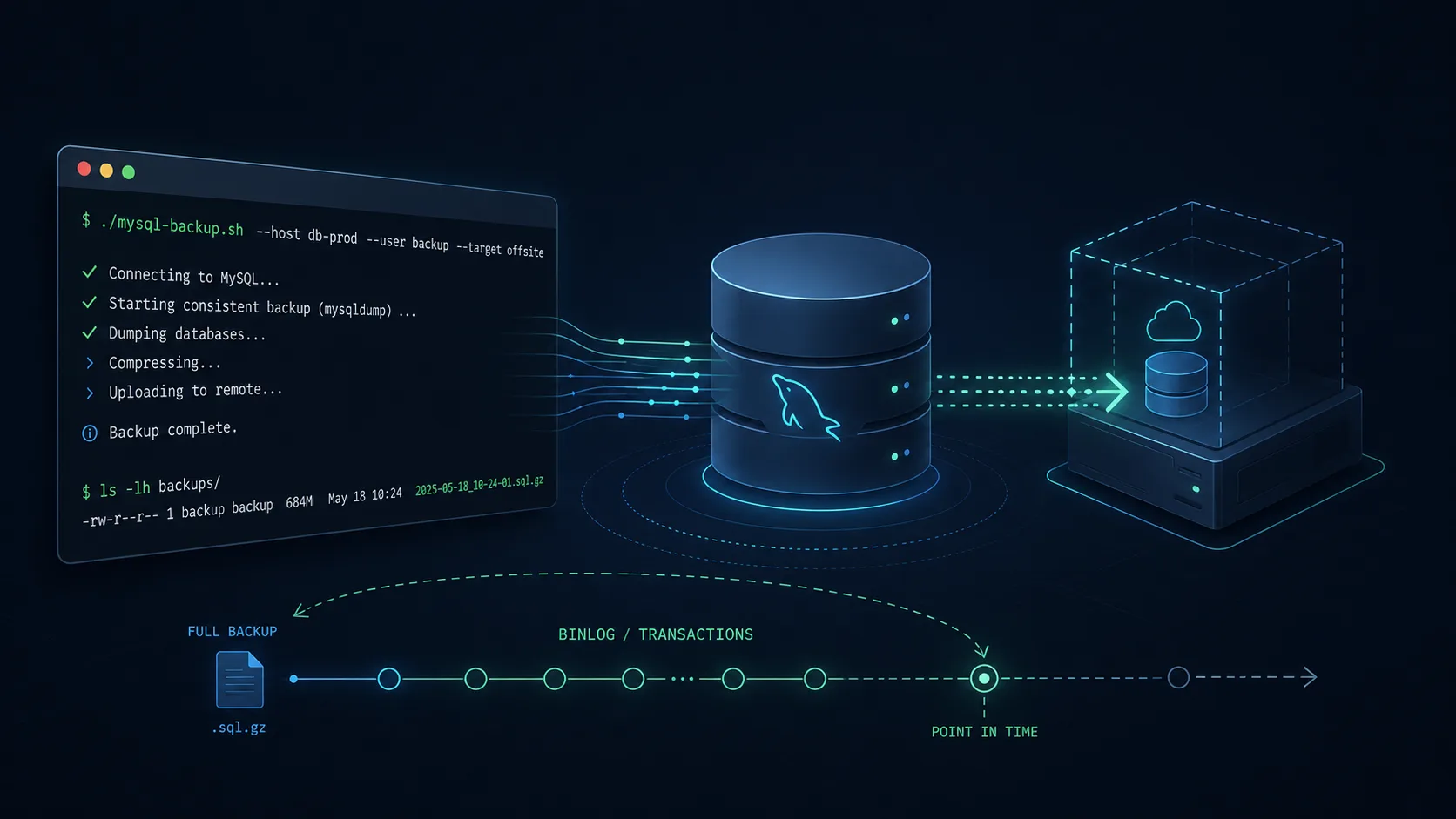
- Generate the MySQL dump locally.
- Compress it.
- Copy it to another VM over SSH.
- Keep a few days of local backups.
Now, even if the main server has an issue, the backup exists somewhere else. No complex control plane. No cloud credentials. No dashboard. No new dependency beyond SSH.
It is not the most advanced backup architecture in the world.
That is the point.
The Role of Binlogs in Disaster Recovery
The dump gives you a clean restore point.
But if the dump runs every 6 hours, there is still a gap.
For example, say cron runs the backup at:
00:0006:0012:0018:00Now imagine something goes wrong at 17:30.
The latest dump is from 12:00. If you restore only that dump, you lose everything between 12:00 and 17:30.
This is where MySQL binary logs become important.
MySQL binlogs record changes made to the database. If you have the dump from 12:00 and the binlogs after that point, you can restore the dump first, then replay the binlogs up to the point just before the disaster.
The rough recovery flow would look like this:
First, restore the latest clean dump:
gunzip < my_database_20260701_120000.sql.gz | mysql -u root -p my_databaseThen replay binary logs from after that backup:
mysqlbinlog mysql-bin.000123 mysql-bin.000124 | mysql -u root -pIf you know the exact time when the bad event happened, you can stop before that time:
mysqlbinlog \ --start-datetime="2026-07-01 12:00:00" \ --stop-datetime="2026-07-01 17:29:00" \ mysql-bin.000123 mysql-bin.000124 | mysql -u root -pSo the backup gives you the base state.
The binlogs give you the changes after that base state.
Together, they allow point-in-time recovery.
In theory, this means that even if the dump runs every 6 hours, you are not necessarily limited to losing 6 hours of data. You can restore the last dump and replay the binlogs up to the safe moment.
Now, to be very honest, I have not had to use this disaster recovery flow in production yet.
And I pray to the Linux gods that I never have to.
But designing the system this way gives me a recovery story that I can understand.
And that matters.
What the Script Actually Does
The tool is intentionally small.
It is a Bash script driven by a config file.
You copy the example config:
cp backup.conf.example backup.confThen you configure the database connection:
DB_HOST="127.0.0.1"DB_PORT="3306"DB_NAME="my_database"DB_USER="backup_user"DB_PASSWORD="change_me"Then you configure where local backups should go:
LOCAL_BACKUP_DIR="/var/backups/mysql"Then you configure the remote VM destination:
REMOTE_USER="backup"REMOTE_HOST="example.com"REMOTE_PORT="22"REMOTE_BACKUP_DIR="/var/backups/mysql"Optionally, you can provide an SSH key path:
SSH_KEY_PATH="/path/to/private/key"When the script runs, it does a few basic things.
First, it loads the config file.
Then it checks whether required commands are available, including:
mysqldumpgzipscpfindmkdirdateThen it validates required config values like database host, port, name, user, password, local backup directory, and remote backup destination.
Then it creates the local backup directory if it does not exist.
Then it generates a timestamped file name:
my_database_20260701_020000.sql.gzThen it runs mysqldump.
The dump uses important options:
--single-transaction--no-tablespaces--routines--triggers--events--single-transaction is useful for taking a consistent backup without locking everything unnecessarily, especially for InnoDB tables.
--routines, --triggers, and --events make sure the backup is not just table data, but also includes database logic that might be important for restoration.
--no-tablespaces avoids needing unnecessary global privileges in MySQL 8 for many normal backup use cases.
The dump is piped directly into gzip, so the backup is compressed immediately:
mysqldump ... | gzip > backup.sql.gzAfter the local compressed dump is created, the script copies it to the remote VM using scp.
If an SSH key path is configured, it uses that key. Otherwise, it relies on normal SSH agent or default key behavior.
Finally, after the remote copy succeeds, it deletes old local backups for that database older than 3 days.
That means the main server does not keep accumulating dump files forever.
The remote VM becomes the longer-term backup destination, while the local server only keeps recent copies.
Why a Dedicated MySQL Backup User Matters
One small but important detail: the tool is designed to work with a dedicated MySQL backup user.
That user only needs the privileges required to read and dump the configured database:
GRANT SELECT, SHOW VIEW, TRIGGER, EVENT, LOCK TABLESON `my_database`.* TO 'backup_user'@'localhost';This is much better than using the MySQL root user or the application’s database user.
The backup script should have exactly the access it needs.
Nothing more.
This keeps the setup simple, but still sane.
Cron Is the UI
For scheduling, I do not need a web dashboard.
Cron is enough.
A daily backup can be configured like this:
0 2 * * * /path/to/mysql-backup.sh /path/to/backup.conf >> /var/log/mysql-backup.log 2>&1A backup every 6 hours can be configured like this:
0 */6 * * * /path/to/mysql-backup.sh /path/to/backup.conf >> /var/log/mysql-backup.log 2>&1That is the entire scheduling system.
No background worker.
No queue.
No web panel.
No hidden state.
Just cron.
The log file tells me what happened. The backup directory tells me what exists. SSH tells me whether the remote copy worked.
This is the kind of boring infrastructure I like.
Where This Tool Fits
This is not a replacement for serious backup planning.
It does not magically solve every disaster recovery problem.
It does not replace replication.
It does not replace offsite backups.
It does not replace restore testing.
It does not replace monitoring.
It is simply one small piece in a layered backup strategy.
For a small MySQL database, this is often enough to sleep better:
- VM-level backup for machine recovery.
- MySQL dump for portable database recovery.
- Remote VM copy for separation.
- Binlogs for point-in-time recovery.
- Cron for scheduling.
- Shell script for clarity.
That is it.
How This Can Be Improved Further
The current version is intentionally simple, but there are several ways it can be improved without turning it into a monster.
1. Remote Retention
Right now, local retention is handled by deleting old local backups after a successful remote copy.
A future version could also clean up old backups on the remote VM.
For example:
Keep hourly backups for 2 days.Keep daily backups for 14 days.Keep weekly backups for 2 months.This would make the remote storage more predictable.
2. Restore Command
Backup tools are only half useful if restore is not documented.
A helper restore script could make the recovery process clearer:
./restore.sh my_database_20260701_120000.sql.gzIt could ask for confirmation, create the target database if needed, and restore the dump safely.
3. Checksum Verification
After copying the file to the remote VM, the script could compare checksums.
For example:
sha256sum backup.sql.gzThen verify that the remote file has the same checksum.
This would confirm that the copied file is not corrupted or incomplete.
4. Backup Size Sanity Check
A very small backup file can be suspicious.
If yesterday’s backup was 800 MB and today’s backup is 5 KB, something is probably wrong.
The script could warn when the backup size is unexpectedly small.
5. Notification Support
The script could send a notification after success or failure.
This can be done without adding a full dashboard.
For example:
ntfyemailSlack webhookDiscord webhookTelegram botA simple success/failure alert is enough.
6. Encryption Before Remote Copy
If the remote VM is not fully trusted, the dump can be encrypted before copying.
For example, using gpg or age.
The flow would become:
mysqldump → gzip → encrypt → scpThat way, even if someone gets access to the backup VM, they cannot directly read the database dump.
7. Multiple Database Support
The current setup is focused on one configured database.
It could be extended to support multiple databases by looping over a list.
But this should be done carefully.
The beauty of the tool is that it is easy to understand. Adding multiple database support should not make the config unreadable.
8. Binlog Archival
If the backup strategy depends on binlogs, then binlogs also need to be protected.
A future version could archive binlogs to the remote VM along with the dump.
That would make the point-in-time recovery story much stronger.
9. Automated Restore Testing
The most underrated backup feature is not backup.
It is restore testing.
A future setup could periodically restore the latest dump into a temporary database or test VM, just to confirm that the dump is valid.
Because a backup that cannot be restored is not a backup.
It is just a comforting file.
Final Thought
I created this tool because I wanted a backup flow that matched how I think.
Terminal-first.
Cron-driven.
No unnecessary UI.
No cloud dependency by default.
No magic.
Just a compressed MySQL dump copied to another VM.
There are more advanced ways to do backups.
There are more scalable ways.
There are more enterprise-grade ways.
But for many small databases and practical systems, boring is exactly what you want.
Because when disaster strikes, the last thing you want is a backup system that needs debugging.
You want a file.
You want a command.
You want a restore path.
And ideally, you want to never use it.
May the Linux gods keep it that way.
LogCTL Dispatch
New essays, experiments and workflows. No daily noise.
Usually 2–4 emails a month.
Comments
Loading comments…